1. Export a TXT marker file from Avid Media Composer
To export timeline markers, go to: "Tools -> Marker". Right Click on "Export Markers as Text".
2. Use the "마커 변환기" to convert the TXT marker file into a CSV file
Open the free 마커 변환기, select "Avid Media Composer > Marker Text (.txt)" and set "convert" to "CSV for Google Sheets". Generate and download the file. 파일 변환에 문제가 있으면 무료 지원팀에 문의할 수 있습니다.
3. Import the CSV file into Google Sheets
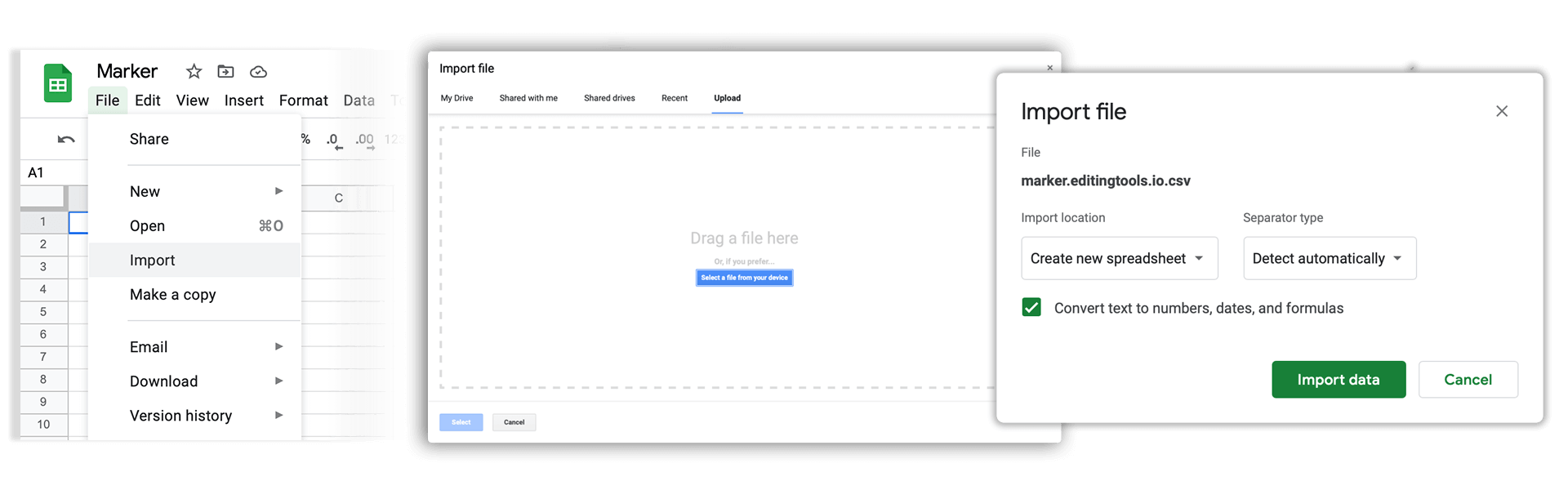
Open Google Sheets and go to "File -> Import". Upload the generated CSV file and press "Import Data" to generate the Sheet with all markers.
🚀 완료
이제 끝났습니다! 이 튜토리얼이 유용했다면 공유하여 저희를 응원해 주세요. 워크플로 개선에 대한 제안이 있다면 알려 주세요!